UX Anatomy
UX Anatomy: The Slider
A darkly whimsical UX Anatomy field note on the slider: why range controls, draggable handles and approximate values can frustrate users when precision, accessibility or clear feedback matter.
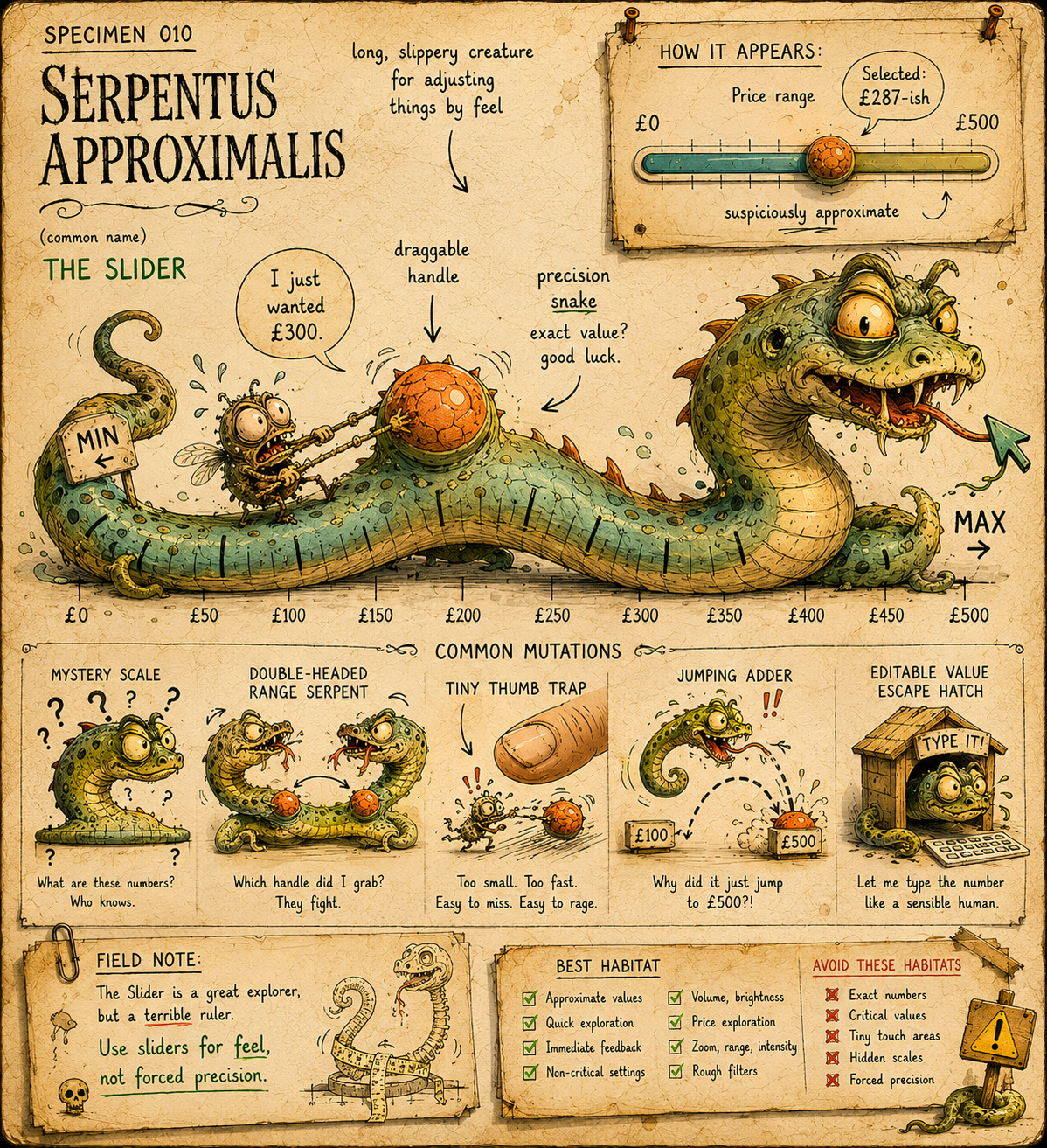
Specimen 010: The Slider
Creature name: Serpentus Approximalis
Common name: The Slider
Habitat: Price filters, volume controls, brightness settings, range selectors, search refinement panels, dashboards, booking tools, product filters, donation amounts, comparison tools, and anywhere the interface wants users to drag a tiny thing along a line and pretend that counts as precision.
Field Description
Serpentus Approximalis is a long, slippery interface creature commonly found coiled around ranges, filters and adjustable settings.
In healthy specimens, it helps users make quick, approximate adjustments. It is useful when the exact value does not matter too much, the range is understandable, and the feedback is immediate.
In unhealthy specimens, it becomes a tiny precision snake with a grudge.
It asks users to drag a minuscule handle. It hides exact values. It jumps between numbers unpredictably. It becomes nearly impossible to use on mobile. It offers no text input alternative. It makes users fight for £250 when all they wanted was up to £300.
The Slider is not evil by nature.
But it is often released into habitats where it should never have been allowed to breed.
Anatomical Function
The Slider exists to let users choose a value or range from a continuous or stepped scale.
Its job is to communicate:
- What can be changed
The user should understand what the slider controls. - What the current value is
The selected value or range should be visible. - What the limits are
Minimum, maximum and meaningful steps should be clear. - How precise the choice needs to be
The interaction should match the level of accuracy required. - What happens when the value changes
Feedback should be immediate, understandable and not computationally cursed.
Sliders work best when the user is adjusting a value by feel.
They work badly when the user needs accuracy, comparison, typing, accessibility, or a value that sits awkwardly between steps.
Healthy Slider Traits
A healthy Serpentus Approximalis should:
- have a clear label
- show the selected value
- show minimum and maximum values where relevant
- use sensible steps
- provide text input where precision matters
- have a large enough handle and touch target
- work with keyboard controls
- expose value and state to assistive technologies
- give clear feedback when the value changes
- avoid overloading users with invisible scale logic
- avoid using sliders for choices that are actually discrete categories
- avoid making users drag tiny handles for values they could type faster
A good slider feels fluid.
A bad slider feels like trying to negotiate rent with an eel.
Common Mutations
1. The Precision Snake
This mutation appears when the interface asks users to choose an exact value using a tiny draggable handle.
Symptoms include:
- hard-to-hit handles
- values that jump too far
- no way to type the exact number
- awkward increments
- tiny movements causing big changes
- mobile thumb combat
If the user needs to choose exactly £275, a slider alone is probably a bad idea.
Let people type. Let people edit. Let people escape the snake.
2. The Mystery Scale
This mutation hides the meaning of the scale.
The slider has a line. The line has ends. Somewhere on the line is the user's fate.
But what do the values mean?
Examples include:
- no minimum or maximum labels
- unclear step intervals
- no visible selected value
- vague labels like "Low" and "High"
- non-linear scales that look linear
- price ranges that jump unpredictably
A slider should not require the user to develop cartographic instincts.
If the scale is weird, explain it.
3. The Double-Headed Range Serpent
This mutation has two handles: minimum and maximum.
In theory, this lets users select a range.
In practice, the two heads often fight.
Common issues include:
- handles overlap
- users grab the wrong handle
- min and max values become unclear
- dragging one handle moves the other
- mobile interaction becomes a tiny thumb wrestling match
- users cannot easily reset the range
Range sliders can be useful, but they are also one of the fastest ways to turn a filter into a reptile enclosure.
Pair them with visible editable values.
4. The Tiny Thumb Trap
This mutation creates a slider handle so small that users need suspicious levels of finger precision.
The user tries to drag the control. The page scrolls. The handle jumps. The value changes too much. A nearby filter opens. Somewhere, a product manager says "it tested fine on desktop."
Mobile sliders need generous hit areas, clear spacing and careful touch behaviour.
Tiny handles belong on dollhouse furniture, not critical filters.
5. The Value Vanisher
This mutation hides the current value until the user interacts, or shows it only briefly.
Users should not have to drag the snake to discover where it is.
The selected value should be visible before, during and after interaction.
If the value affects results, price, eligibility, visibility, volume, brightness or any meaningful outcome, show it clearly.
Do not make people interrogate the serpent.
6. The Jumping Adder
This mutation moves in surprising increments.
The user tries to select 30. The slider jumps from 25 to 50. Or it allows every number but becomes impossible to land on the one they want.
This often happens when the step size, range and track length are poorly matched.
Good sliders use increments that match user expectations.
Bad sliders behave like a startled snake in a spreadsheet.
7. The Decorative Noodle
This mutation appears when a slider is used because it looks interactive, not because it is the right control. Examples include:
- rating scales that would work better as radio buttons
- donation amounts that need preset buttons plus custom input
- price filters that need min/max text fields
- binary choices that should be toggles
- category filters pretending to be continuous ranges
Not every line with a knob on it deserves to exist.
Some noodles are ornamental. Some are actively hostile.
Behavioural Symptoms
You may have an unhealthy Serpentus Approximalis infestation if users:
- struggle to select an exact value
- repeatedly overshoot the value they want
- abandon filters
- use default ranges instead of adjusting them
- cannot tell what value is currently selected
- misread the scale
- fail to realise the slider has changed results
- get stuck with overlapping handles
- accidentally scroll the page instead of dragging
- cannot operate the control with keyboard or screen reader
- ask why they cannot just type the number
That last one is usually the serpent giving evidence against itself.
UX Diagnosis
Sliders are seductive because they look simple.
One line. One handle. A visible range. Very clean. Very modern. Very "we made a component library and now everything must be draggy."
But sliders carry hidden complexity.
They require motor control, visual interpretation, value feedback, scale understanding, accessible state management and often a clear relationship with live results. When any of that is missing, the slider stops feeling direct and starts feeling slippery.
The key question is not "can this value be represented as a range?"
The better question is:
Does dragging help the user make this decision?
For volume and brightness, yes. The user adjusts by feel and receives immediate feedback.
For exact budget limits, age, dates, quantities, measurements or form values, often no. In those cases, a slider may still help exploration, but it should usually be paired with editable fields, sensible presets or clearer alternatives.
The Slider is best for approximation.
It is not a precision instrument. It is a snake with a ruler.
Accessibility Notes
Sliders need careful accessibility work because custom draggable controls often fail basic interaction requirements.
Watch for:
- missing labels
- values not exposed to assistive technology
- keyboard controls not supported
- unclear focus states
- low contrast tracks or handles
- tiny touch targets
- value changes not announced
- no text input alternative
- double-handle sliders with confusing focus order
- sliders that trigger large content changes without warning
- instructions that rely only on visual dragging
- custom components that do not behave like real sliders
A slider should be usable without a mouse, without perfect vision, without fine motor precision, and without guessing what the snake is thinking.
Where precision matters, provide another way to enter the value.
Accessibility is not improved by making everyone fight the same reptile.
Practical Treatment
- Use sliders for approximate adjustment
Use a slider when "roughly more or less" is good enough.Good habitats:
- volume
- brightness
- map zoom
- rough price exploration
- approximate distance
- visual intensity
- before-and-after comparisons
Risky habitats:
- exact dates
- precise money amounts
- legal values
- form fields requiring accuracy
- small numeric ranges with meaningful steps
- critical settings
If the value matters precisely, do not rely on dragging alone.
- Show the value clearly
Position, colour, text and accessible state should all agree.Display the current value near the slider.
For range sliders, show both min and max.
Better:
Price range: £100 to £300
Not:
A mysterious handle somewhere between “cheap-ish” and “financial incident.”
- Provide editable values
If users may want a specific number, give them input fields as well.Better:
Min price [£100]------------Max price [£300]
Slider underneath for explorationThis lets the snake be useful without becoming the only route through the swamp.
- Choose sensible steps
For high-impact settings, add supporting text.Match increments to the task.
A donation slider might use £5 or £10 steps. A price filter might use £25 or £50 steps. A volume slider may use smaller increments.
The step size should feel natural, not like the interface is throwing dice.
- Make handles easy to use
Use generous touch targets, visible handles and enough spacing around the control.If there are two handles, make it clear which one is active.
Do not make users perform fingertip surgery on a hostile noodle.
- Explain unusual scales
If the scale is non-linear, logarithmic, weighted, capped or otherwise peculiar, give users enough context.A slider that looks linear but behaves non-linearly is a betrayal in worm form.
- Avoid surprise updates
If the slider changes results live, make that clear.For expensive or slow updates, consider applying changes after release or using an Apply button.
Do not reload the universe on every pixel of movement.
Better Patterns
Use:
Budget
£100 to £300
[editable min] [editable max]
Slider for quick adjustment
Instead of:
Budget
drag tiny snake, hope for fiscal accuracy
Use:
Distance
Within 10 miles
Instead of:
Near / Far
Use:
Volume
60%
with immediate feedback.
Use:
Price range
£0 £50 £100 £150 £200
with visible scale points if steps matter.
Use preset buttons when users commonly choose known values:
£10 / £25 / £50 / £100 / Custom
Instead of forcing everyone onto a donation serpent.
Use radio buttons when choices are discrete:
Small / Medium / Large
instead of a slider pretending those are continuous values.
The pattern is simple: use sliders for feel, not forced precision.
Field Note
A slider should help users explore a range, not wrestle a snake for a number.
When Serpentus Approximalis is healthy, it is smooth, labelled, visible and forgiving.
When it is sick, it becomes a slippery little nuisance that hides values, jumps between increments, traps thumbs and refuses to let anyone type.
The Slider is not the enemy.
But when precision matters, do not hand the user a snake and call it a ruler.